Spanish DTT in the NAS: a Docker image for tdt-local
Posted on Thu, 05 Nov 2026 in Herramientas
The TV can be a browser tab. tdt-local handles the hard part (the HLS live streams of Spanish DTT and radio, with EPG and multiview), but the project publishes no Docker. So I wrote the wrapper and left it running on the NAS.
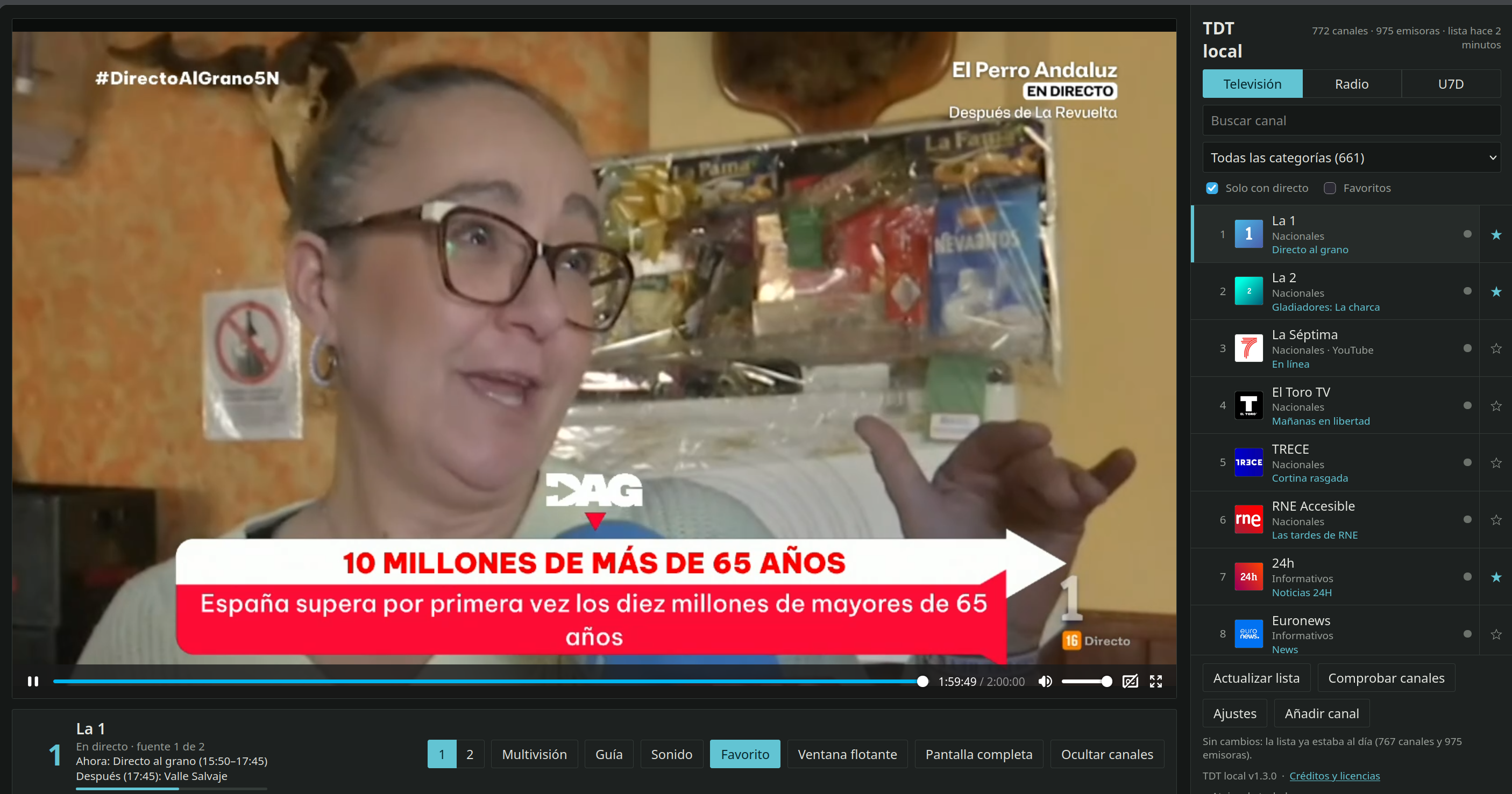
There it is: 772 channels and 975 radio stations read from the TDTChannels lists, La 1 live and everything else one click away.
What tdt-local is
A local web viewer for Spanish DTT. It plays the HLS streams through a proxy of its own, brings EPG data, builds a four-channel multiview with rotating audio and keeps the last seven days of RTVE (U7D). It transcodes nothing: it just forwards what the broadcasters already serve, so any CPU will do.
What it doesn't ship is a Dockerfile or a published image. That's where this repo comes in.
What's inside the image
The Dockerfile is forty lines: python:3.12-slim, the source code of whichever release, pip install . and off you go.
ARG TDT_VERSION=1.3.0
ARG TDT_SHA256=dc3f2bc7eb25d35919b572e7b2072cbf8082b062c3d80d5a4f1828f36bdf6862

ADD https://github.com/cibernicola/tdt-local/archive/refs/tags/v${TDT_VERSION}.tar.gz /tmp/tdt-local.tar.gz
RUN echo "${TDT_SHA256}  /tmp/tdt-local.tar.gz" | sha256sum -c - && \
    tar -xzf /tmp/tdt-local.tar.gz --strip-components=1 && \
    pip install --no-cache-dir .
The version is pinned and the sha256sum -c is not optional: if the tarball GitHub serves doesn't match, the build dies. This image ends up in anyone's docker pull, and I don't want its contents to depend on some third party keeping the same file forever.
ffmpeg is included because the subtitles and the SCTE-35 ad markers need it. That's about 450 MB of image: with --build-arg WITH_FFMPEG=0 it drops to roughly 120 MB, at the cost of losing those two features.
The GitHub Action builds linux/amd64 and linux/arm64 with buildx and pushes to GHCR under the version tag and latest. The same image works on an x86 NAS and on a Raspberry.
Running it
docker run -d --name tdt-local -p 8788:8788 -v "$PWD/data:/data" \
  -e TDT_AI_ENABLED=0 -e TDT_STT_ENABLED=0 --restart unless-stopped \
  ghcr.io/pcaro/tdt-local-docker:latest
Then open http://NAS-IP:8788/. The first run needs internet to fetch the lists; after that it uses the copy kept in the volume. With Compose, the compose.yaml in the repo is ready to go.
Unraid: the template and its traps
The NAS runs Unraid, so besides the Dockerfile I left a template. Over SSH or with the >_ button in the UI:
curl -fsSL -o /boot/config/plugins/dockerMan/templates-user/my-tdt-local.xml \
  https://raw.githubusercontent.com/pcaro/tdt-local-docker/main/unraid/tdt-local.xml
Then Docker → Add Container → pick tdt-local under Template, check the port and the folder, and hit Apply.
Two things I wasted time learning:
- The Template URL field on that screen downloads nothing. In Unraid's source it sits inside a
noshowblock: it's metadata for the template author, not an import button. - Post Arguments must stay empty. Whatever you type there replaces the image's
CMD, and the container starts and dies without saying why.
The big one: you can't save settings
The settings screen always answers this:
POST /api/settings → 403 {"error": "los ajustes solo se pueden cambiar desde el propio equipo"}
It's not a container bug. The program only accepts settings writes when the request comes from 127.0.0.1, and from Docker the request arrives with the bridge IP.
Three ways to live with it, from least to most annoying:
- Environment variables, which is the normal path. Any setting on that screen can be pinned with
TDT_<SETTING_NAME_UPPERCASED>, and once pinned the UI shows it read-only:TDT_UPDATE_HOURS=12,TDT_EPG_ENABLED=0,TDT_AUTO_CHECK=1,TDT_LLM_URL=http://192.168.1.10:8080/v1,TDT_LLM_API_KEY=…(that way the key never lands insettings.json). docker exec, for a one-off change, because inside the container127.0.0.1really is loopback.- SSH tunnel with host networking:
network_mode: hostin the compose file and thenssh -L 8788:127.0.0.1:8788 root@your-nas. Withbridgenetworking the tunnel is useless.
The second option, concretely, looks like this:
docker exec tdt-local python -c "import urllib.request as u, json; \
  r=u.Request('http://127.0.0.1:8788/api/settings', data=json.dumps({'update_hours':12}).encode(), \
  headers={'Content-Type':'application/json'}); print(u.urlopen(r).read().decode())"
Reading settings, refreshing the lists, checking channels and adding your own channels all work fine; the only blocked thing is saving from the web UI.
What it doesn't ship, and what to keep in mind
- The AI assistant and subtitles are off (
TDT_AI_ENABLED=0,TDT_STT_ENABLED=0). They needllama.cppandwhisper-server, which are separate programs and want real CPU and RAM. If you have an AI server on the network, pointTDT_LLM_URLat it and flip the variable. - No authentication. The author says it himself and I'll repeat it: LAN or VPN, never behind a public reverse proxy.
- All the video goes through the NAS. It doesn't transcode, but each channel costs twice its bitrate on the network card: a four-channel multiview at 6 Mbps is about 48 Mbps.
- Data lives in the
/datavolume: lists, EPG, your own channels and settings. That's what to copy if you want a backup.
I vibe-coded it, and you can tell
I don't write Unraid templates every day. But as we know, that's no longer needed. The Unraid template was generated by pi-agent and worked first try on the NAS: the XML, the icon, the port and the folder, all in place and the container up without touching a thing.
What didn't work first try was everything else, and that's where vibe coding falls short if you're not the one driving: the 403 on settings, the Template URL field that downloads nothing, the Post Arguments that eats the CMD, the port published on 127.0.0.1 that changes nothing.
The conclusion I take from it: the code is the cheap part. The expensive part is knowing what needs verifying and not trusting that it "should work".
Wrap-up
Spanish DTT fits in a 580 MB container, with no transcoding and nothing exposed to the internet. The original project does all the work; my part is a wrapper, an Unraid template and a README that is basically a log of my stumbles. If you run Unraid and miss having TV in the browser, it takes two minutes.
Fuente original: tdt-local, TDTChannels and tdt-local-docker.