Shot-scraper: Automated Web Screenshots
Posted on Fri, 20 Feb 2026 in Programación
Have you ever needed to take screenshots of a web page programmatically? Perhaps to document your project, monitor UI changes, or generate images for social media. There are many ways to do it, but shot-scraper stands out for its ease of use and power.
Created by Simon Willison, shot-scraper is a command line interface (CLI) tool that wraps Playwright to make taking screenshots trivial.
Installation
As with other modern Python tools, the best way to install it is using uv:```bash
uv tool install shot-scraper
Once installed, you'll need to download the browser it uses under the hood (Chromium):

```bash
shot-scraper install
Basic Usage
The simplest way to use it is to give it a URL and a filename:
shot-scraper https://pablocaro.es/en/ blog.png
This will generate an image named blog.png with the screenshot of the page.
Capturing Specific Selectors
One of the most powerful features is the ability to capture only a specific element of the page using CSS selectors:
shot-scraper https://github.com/pcaro -s ".js-calendar-graph" calendar.png
This command will capture only the GitHub contribution graph.
Interacting with JavaScript
Sometimes you need to execute some code before taking the shot. For example, to hide a cookie banner or wait for something to load.
shot-scraper https://pablocaro.es/en/ \
  --javascript "document.querySelector('header').style.display = 'none';" \
  -o no-header.png
Advanced Automation
If you need to take many screenshots, you can define a YAML configuration file:
# shots.yml
- url: https://pablocaro.es/en/
  output: home.png
  height: 800
- url: https://pablocaro.es/en/archives.html
  output: archives.png
  wait: 1000  # Wait 1 second
And run them all at once:
shot-scraper multi shots.yml
Beyond Screenshots
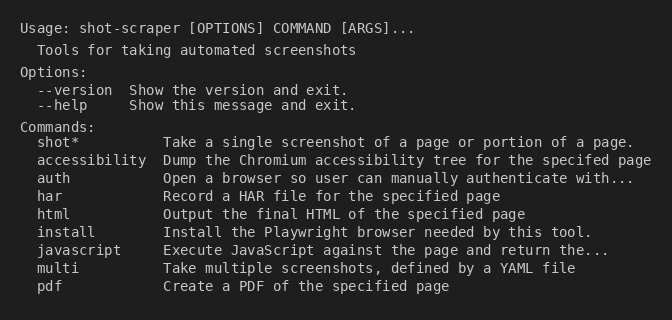
shot-scraper also includes utilities for:
- Accessibility: Dump the accessibility tree of a page (
shot-scraper accessibility). - PDF: Generate PDFs of web pages (
shot-scraper pdf). - HAR: Record HAR files to analyze network traffic (
shot-scraper har).
It's one of those tools that, once installed, you find uses for constantly. Perfect for integrating into CI/CD pipelines to generate documentation visuals automatically.
More info in the official documentation.