DeepDiff: The Swiss Army Knife for Data Comparison in Python
Posted on Fri, 20 Feb 2026 in Programación
When working with structured data in Python, we often need to compare two dictionaries, JSONs, or complex objects to find out what has changed. While direct comparison (==) is useful, sometimes we need to understand exactly what is different: which keys were added, which were removed, or where values have changed, even in deeply nested structures.
This is where DeepDiff comes in.
DeepDiff is an incredibly powerful Python library that offers much more than simple comparison. It is an essential tool for testing, data validation, and API debugging.
Key Features
DeepDiff is not just a tool, it's a suite of utilities:
- DeepDiff: Recursively compares dictionaries, iterables, strings, and other objects. It can ignore order in lists, ignore specific types, or exclude paths from comparison.
- DeepSearch: Searches for objects within other objects, like a
grepfor in-memory data structures. - DeepHash: Calculates hashes of objects based on their content. Very useful for deduplication of complex data where key order doesn't matter.
- Delta: Generates "deltas" (differences) that can be applied to other objects, similar to a
git patchbut for Python objects.
Installation
The modern and recommended way to install Python tools is using uv.
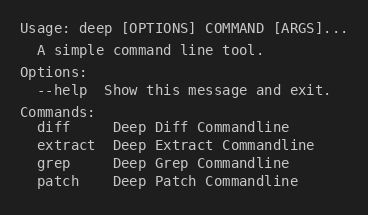
As a Command Line Interface (CLI) Tool
If you just want to use the deep command in your terminal to compare JSON or YAML files:```bash
uv tool install "deepdiff[cli]"
This will install the `deep` command on your system in an isolated environment. Make sure to include `[cli]` to install the necessary dependencies.

### As a Library in Your Project

If you are going to use it within your Python scripts:

```bash
uv add "deepdiff"
Or if you need the CLI inside your virtual environment as well:
uv add "deepdiff[cli]"
Usage Examples
In Python
Imagine you have two slightly different API responses and want to know what changed:
from deepdiff import DeepDiff

t1 = {
    "id": 1,
    "name": "Product A",
    "tags": ["new", "sale"],
    "details": {"price": 100, "stock": 50}
}

t2 = {
    "id": 1,
    "name": "Product A",
    "tags": ["sale", "new"],  # Different order
    "details": {"price": 120, "stock": 50}
}

# By default, order matters in lists
diff = DeepDiff(t1, t2)
# Result shows changes in 'tags' list and 'details.price'

# If we ignore order in iterables
diff_ignore_order = DeepDiff(t1, t2, ignore_order=True)
print(diff_ignore_order)
Output:
{
    'values_changed': {
        "root['details']['price']": {
            'new_value': 120,
            'old_value': 100
        }
    }
}
As you can see, it detected the price change but ignored the order change in tags.
In the Terminal (CLI)
The deep command is very useful for quickly comparing files:
# Compare two JSON files
deep diff production.json development.json
You can also use it to extract information or search within large JSON/YAML files without having to write a script.
Conclusion
DeepDiff is one of those libraries that, once you know about it, you can't stop using. Its flexibility to ignore certain fields (like timestamps or auto-generated IDs) makes it perfect for integration tests and data validation.
You can view the full documentation at zepworks.com/deepdiff.