Installing GitHub Skills
Posted on Sun, 19 Apr 2026 in Programación
Two main ways to install skills for AI agents (Claude Code, Codex, Cursor, etc.): the new gh skill subcommand from GitHub CLI and the npx skills tool from Vercel Labs.
gh skill — GitHub's official approach
GitHub CLI now has a native subcommand for managing skills:
# Search for skills
gh skill search terraform

# Install a specific skill
gh skill install github/awesome-copilot documentation-writer

# Preview before installing
gh skill preview github/awesome-copilot documentation-writer

# Update all installed skills
gh skill update --all

# Validate skills before publishing
gh skill publish --dry-run
How it installs: gh skill copies files (no symlinks) and injects tracking metadata directly into the SKILL.md frontmatter (repository, ref, tree SHA). This metadata enables gh skill update to detect actual content changes by comparing local vs remote tree SHAs.
Where it installs: Defaults to project scope (inside the current git repository), but you can use --scope user to install to your home directory for global availability. Per-agent directories:
| Agent | Project | User |
|---|---|---|
| GitHub Copilot | .agents/skills |
~/.copilot/skills |
| Claude Code | .claude/skills |
~/.claude/skills |
| Cursor | .agents/skills |
~/.cursor/skills |
| Codex | .agents/skills |
~/.codex/skills |
| Gemini CLI | .agents/skills |
~/.gemini/skills |
| Antigravity | .agents/skills |
~/.gemini/antigravity/skills |
Note: GitHub Copilot, Cursor, Codex, Gemini CLI, Antigravity, and Pi share .agents/skills at project scope.
The nice thing is that it's built directly into gh, so if you already use GitHub CLI for everything, you don't need another dependency. But the search is pretty basic and limited to GitHub's ecosystem.
npx skills — Vercel Labs' tool
I've been using npx skills from Vercel Labs for a while and find it more comprehensive for day-to-day work:
# List available skills in a repo
npx skills add github/awesome-copilot --list

# Install a specific skill
npx skills add github/awesome-copilot --skill publish-to-pages

# Install all skills from a repo
npx skills add vercel-labs/agent-skills --all

# Update skills
npx skills update

# Search skills interactively
npx skills find
Advantages I see:
- Multi-agent support: Works with Pi, Claude Code, Codex, Cursor, OpenCode, Gemini CLI, and 40+ other agents. Each has its own skills directory and
npx skillsmanages them all. - Flexible installation: You can install skills globally (
-g) or per-project, and choose between symlinking (recommended for easy updates) or copying files. - Interactive search: The
npx skills findcommand gives you anfzf-style interface to browse available skills. - Granular updates: You can update individual skills or all of them, and choose whether to update global or project skills.
The downside is that search doesn't work perfectly when a repo has multiple skills — sometimes it doesn't find them all or doesn't list them as expected.
But where npx skills really shines is with npx skills find — an interactive fzf-style interface to explore and search available skills. It's way better than the basic search from gh skill:
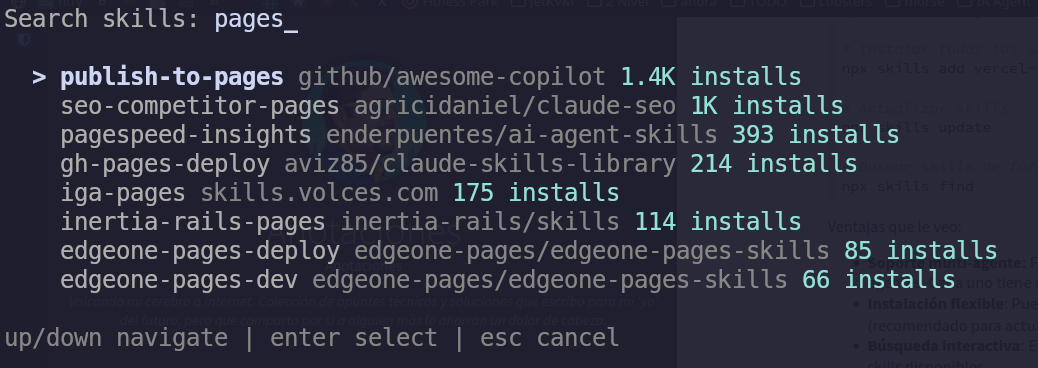
You can search by keyword, interactively browse results, see install counts, and run the install command directly. For discovering new skills, this is hands down the best option.
Technical comparison
| Feature | gh skill |
npx skills |
|---|---|---|
| Installation method | Copies files | Symlink (recommended) or copy |
| Default scope | Project | Project |
| Global scope | --scope user |
-g / --global |
| Version tracking | Tree SHA in frontmatter | Similar metadata |
| Update mechanism | Compares local vs remote tree SHA | Git pull on repo |
| Supported agents | 6 (Copilot, Claude, Cursor, Codex, Gemini, Antigravity) | 40+ |
| Interactive search | No (gh skill search is basic) |
Yes (npx skills find with fzf) |
| Integration | Native in gh CLI | Standalone tool |
skills-lock.json — npx skills' lock file
npx skills maintains a global lock file at ~/.agents/.skill-lock.json (v3 format) that tracks:
- All globally installed skills
- Their source (repo, URL, source type)
- Folder hash for change detection
- Installation and last update timestamps
- User preferences (selected agents)
Currently it works as a registry for npx skills update to know what to check, but not as a declarative manifest — there's no npx skills install command to restore skills from scratch reading the lock (like npm ci would). So if you delete your installed skills, the lock file only serves as reference, not for automatic restoration.
My current workflow
For installing new skills:
# See what skills a repo has
npx skills add github/awesome-copilot --list

# Install only the ones I need
npx skills add github/awesome-copilot --skill publish-to-pages --skill documentation-writer
And for keeping them updated:
npx skills update
Bottom line: I'm sticking with Vercel's npx skills without a doubt. GitHub CLI is fine if you only use Copilot and want everything integrated in gh, but if you work with multiple agents (like me, using Pi as my main agent), npx skills is far superior for its multi-agent support, flexibility, and especially npx skills find for discovering new skills.